Production scheduling for a small job shop
A small job shop doesn't need an optimizer. It needs every open step on the machine it runs on, in due-date order, with setup time counted, outside processing included, and anything that will finish after its due date flagged while there's still time to call the customer. Here's the method, a worked example, and where a spreadsheet stops being enough.
Five rules that work
- Schedule steps, not jobs. A job is saw, Op 10 on the mill, Op 20, deburr, anodize, inspect. Each step lands on one machine.
- Count setup. A 90-minute setup for 12 parts changes the picture.
- Earliest due date first, unless running two jobs with the same setup back to back saves real time without making either late.
- Put outside processing on the schedule with the vendor's promised date. That's where most late jobs hide.
- Flag late before it's late. Any step that pushes a part past its due date is the list for today's phone calls.
Worked example: three machines, four jobs
A mill (8 hours a day), a lathe (8 hours) and an outside anodizer (4 working days, vendor's promise). Today is Monday.
| Job | Due | Steps (setup + run) |
|---|---|---|
| A: 40 brackets | Fri | Mill 1.5 h + 40 × 6 min = 5.5 h → anodize (4 days) |
| B: 12 shafts | Wed | Lathe 1 h + 12 × 15 min = 4 h |
| C: 25 housings | Thu | Lathe 1 h + 25 × 9 min ≈ 4.75 h → mill 1 h + 25 × 8 min ≈ 4.3 h |
| D: 8 plates | next Tue | Mill 0.5 h + 8 × 20 min ≈ 3.2 h |
Lathe: B first (due Wed), 4 h Monday morning; then C's lathe step, 4.75 h, finishing Tuesday morning.
Mill: A first: its anodize takes 4 working days, so it has to leave Monday night to be back Friday. Then C's mill step Tuesday after the lathe, done Tuesday afternoon. D last.
The catch: A leaves for anodize Monday at the end of the day and the anodizer promises 4 working days: back Friday, the due date. No slack at all. That's the call to make today: ask the anodizer for 3 days, or tell the customer Monday. A spreadsheet sorted by due date wouldn't have shown it, because A looks like it has until Friday.
Where a spreadsheet breaks
- One row per job can't show a job on two machines and a vendor.
- When a step runs long, nothing downstream moves unless someone moves it.
- Outside processing is a note, not a date on the plan.
- Two people editing means two schedules.
What scheduling software should show you
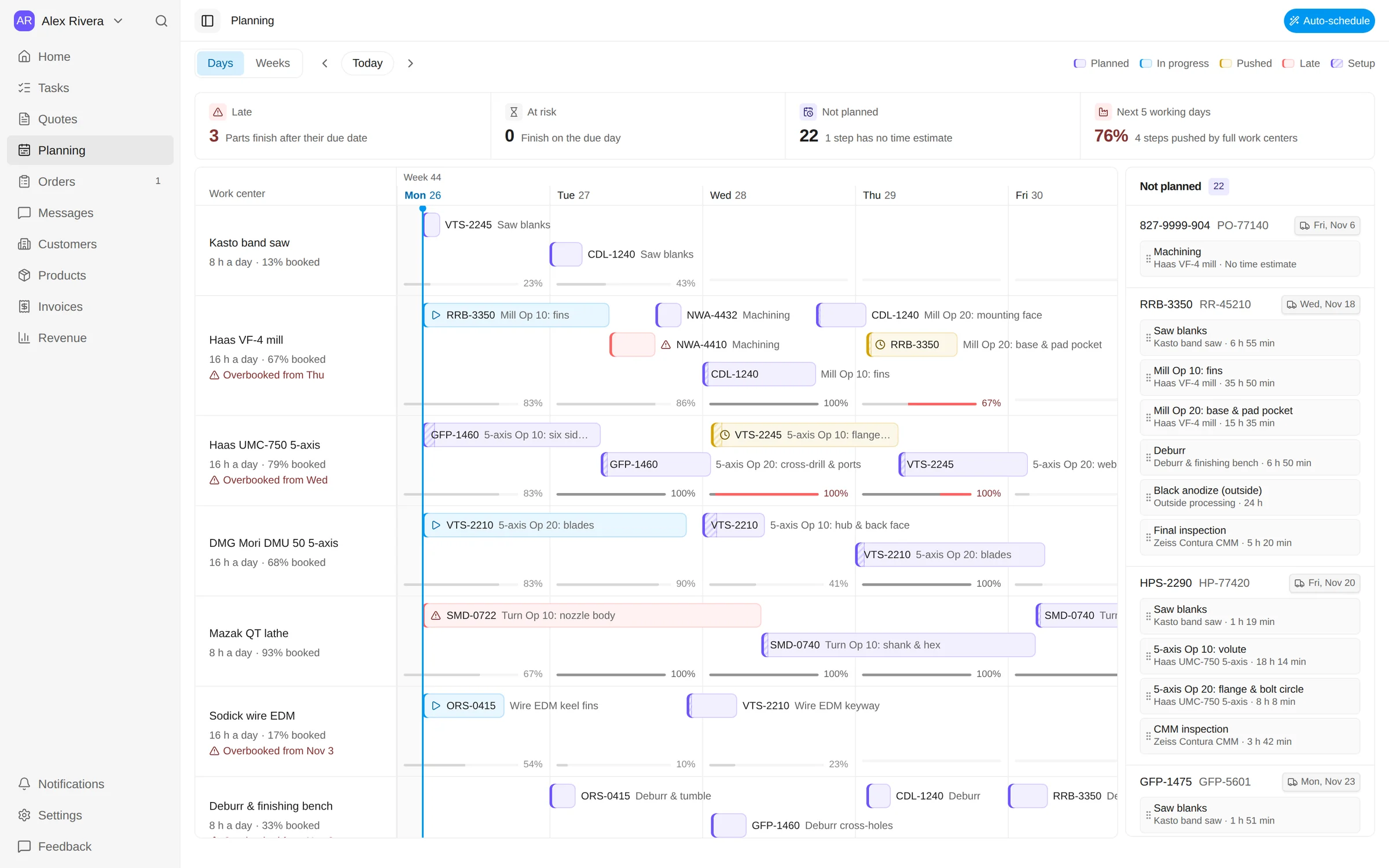
- Every machine as a lane, with each step as a bar, setup included.
- Each machine's load per day, and when it's overbooked.
- Steps with no planned start yet.
- Parts that will finish after their due date, flagged.
- Outside processing with the vendor's date.
- One click to lay out what isn't planned yet, and a preview before you apply it.
That's Tehdo's planning board. It's built on the same steps your people tap through on the floor, so the plan moves when the work does. Watch it lay out a schedule and flag a late job (26 seconds), or open the board in the sample shop.
Questions
What is the best way to schedule a job shop?
Work backward from due dates, load each machine with its steps including setup time, run the earliest due date first unless a changeover saves real time, and keep outside processing on the schedule with the vendor's promised date. Re-plan daily, not weekly.
Can I schedule a machine shop in Excel?
For a few machines and a few dozen jobs, yes: one row per step with machine, hours and due date, sorted by machine and due date. It stops working when steps move between machines, when outside processing slips, and when more than one person changes it.